BIANCA: A Modern Google Slides Template for Clean Design
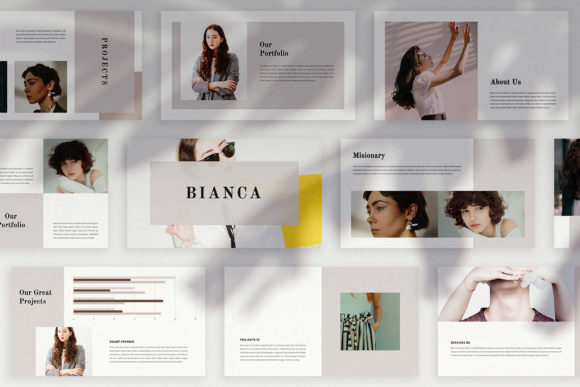
First impressions in a presentation aren't just about what you say; they're about how you frame it. A cluttered, generic slide deck can undermine even the most brilliant idea. This is where a thoughtfully designed template becomes a silent partner in your communication strategy. The BIANCA - Clean Google Slide Template enters this space not as a mere collection of slides, but as a curated visual system. It’s built for professionals who understand that aesthetics directly influence perception and engagement, offering a foundation that feels both polished and adaptable.
Beyond the Default: Why Visual Uniqueness Matters
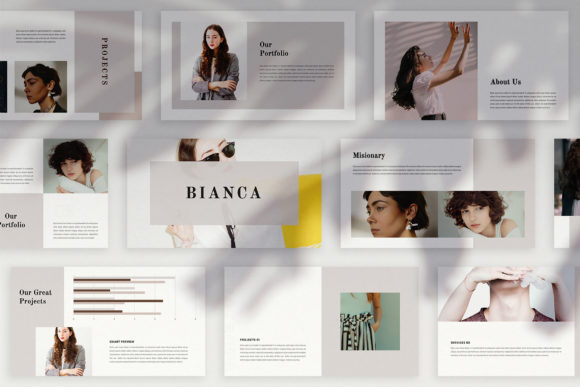
Many presentation tools offer templates with a handful of layouts that repeat throughout the deck. BIANCA takes a different approach. With 36 unique slide layouts, it ensures your presentation maintains visual interest from the first title slide to the final thank you. Each layout is designed with a distinct purpose—whether it’s for introducing a team, showcasing data with clean charts, or presenting a portfolio piece in a magazine-style format. This variety prevents monotony, allowing your narrative to flow naturally without the audience becoming desensitized to the same background and text boxes slide after slide. The concept is clean and neat, providing a sophisticated backdrop that elevates your content rather than competing with it.
The practicality of this design extends to its core functionality. Built on the Slide Master feature, BIANCA allows for swift customization. Dragging and dropping your own images into the designated placeholders is straightforward, and the automatic color change theme is a significant time-saver. Instead of manually recoloring every element to match your brand palette, you can apply a new theme color, and the entire presentation updates consistently. This ensures visual cohesion—a critical component of professional brand identity—without requiring advanced design skills. The use of high-resolution, full HD graphics means your presentation will look sharp on any modern display, from a laptop screen to a large conference room projector.
From Digital Media to Tangible Brand Assets
While its name highlights Google Slides, the utility of a template like BIANCA extends far beyond a simple sales pitch. Its clean, editorial aesthetic makes it a versatile starting point for a range of design projects. Consider the small business owner creating a brand style guide for their team. The lookbook layouts can beautifully organize logo usage, color swatches, and typography rules. A marketing professional can repurpose the slides to create cohesive social media graphics or webinar decks that feel integrated with their broader campaign materials.
The included mockups, icons, and map graphics add another layer of functionality. These aren't just decorative; they are tools for communication. Use the device mockups to showcase a new website or app interface. Incorporate the icons to create clear, infographic-style slides that simplify complex information. The map is ideal for businesses with multiple locations or for illustrating a market expansion plan. Because the template is fully editable, these elements can be adapted for other purposes, such as designing clean posters for an event, creating informational brochures, or even drafting layouts for a digital product manual.
Practical Advice for Effective Implementation
Having a premium template is one thing; using it effectively is another. The key to leveraging BIANCA is to view it as a flexible framework, not a rigid structure. Start by defining the core message of your presentation. Then, select the specific unique layouts that best support each section of your story. The "many variations of layout and text" mean you can choose a slide with ample white space for a powerful quote, or one with a structured grid for comparing products side-by-side.
Typography plays a crucial role in maintaining the template's clean aesthetic. BIANCA includes links to the free fonts used in the preview, which is a thoughtful touch. Adhering to these recommendations ensures the text remains as polished as the visuals. For your own branding, consider how these fonts pair with your existing typefaces. A clean sans-serif font from the template might complement your brand's primary script font for headings, creating a balanced hierarchy. Always prioritize readability; ensure text is large enough and has sufficient contrast against its background, especially when presenting to a broad audience.
Finally, remember the licensing. The template itself is licensed for your use, but the preview images are not included. This is standard practice, and sourcing your own high-quality photographs from sites like Unsplash or Pexels is part of the creative process. It also ensures your final presentation is wholly original, using visuals that are uniquely relevant to your content and brand story.
A Foundation for Polished Communication
Ultimately, a tool like the BIANCA template is about removing friction from the creative process. It provides a professionally designed starting point so you can focus on what truly matters: your message. Whether you're an entrepreneur pitching to investors, a designer presenting concepts to a client, or a educator creating engaging course materials, the value lies in its ability to help you look presentable and prepared. It’s a design asset that supports clarity, reinforces brand consistency, and engages your audience through thoughtful visual communication, proving that sometimes the best presentations are the ones where the design feels effortlessly right.