Craft a Professional Email Signature Vector Template
Every email you send is a touchpoint—a tiny, digital handshake that leaves an impression long after the message is closed. Yet, so many professionals and businesses treat this prime real estate as an afterthought, relying on plain text or a clumsy, pixelated image. A polished, cohesive email signature isn't just about listing your contact details; it's a final, subtle reaffirmation of your brand's identity and professionalism. That's where a thoughtfully designed asset like an Email Signature Vector Template becomes invaluable, providing a foundation that is both visually sharp and incredibly flexible for your specific needs.
Beyond the Basics: What Makes This Template Stand Out
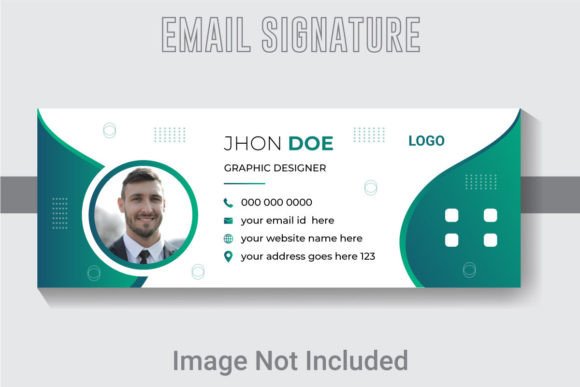
At its core, this is a design asset built for real-world application and longevity. The specifications—851x315 pixels at 300 DPI in RGB color—aren't arbitrary numbers. They translate to a crisp, clear image that will look sharp on high-resolution screens in email clients like Outlook or Gmail, while the dimensions are optimized for a wide, balanced layout that won't get awkwardly cropped. The true power, however, lies in its vector format. Unlike a static JPG, the included AI and EPS files mean every line, shape, and piece of text is fully editable in Adobe Illustrator CS6 or above. You're not just getting a picture; you're getting the blueprints. You can adjust the color palette to match your brand's hex codes, swap the free font for one from your own typeface library, or reposition elements to perfectly fit your logo. This level of control is what separates a generic signature from a branded one.
Practical Applications for Every Professional
The versatility of a well-structured vector template extends far beyond just signing off emails. Consider its role in building a cohesive brand identity. Use the same visual language—the same color blocks, icon styles, and typography—across your email signature, your social media profile banners, and your website's contact section. This creates instant recognition. For small business owners and entrepreneurs, this consistency is foundational. It tells your audience you pay attention to details, which builds trust.
Think about its utility in marketing assets. Need a quick, professional-looking header for a newsletter? The template's layout can be adapted. Creating a presentation for a client? The clean, organized design elements can be repurposed for slide headers or footers. The layered AI file is a designer's playground, allowing for the extraction of individual components—like a social media icon set or a stylized divider—to enhance other projects like packaging mockups, blog graphics, or even print materials such as business cards and letterheads. It becomes a versatile component in your larger design toolkit.
Choosing and Pairing Typography with Purpose
The template's use of a free, editable font is a significant advantage. It gives you a starting point without locking you into a specific style. When you customize it, think strategically about the font's personality. A sleek, modern sans-serif conveys efficiency and clarity, ideal for tech startups or consultants. A classic serif might lend a sense of tradition and authority, suitable for law firms or financial services. A script or handwritten font could add a personal, creative touch for artists, bloggers, or boutique shops.
The key is matching the typography to your project's goals and your audience's expectations. Readability is non-negotiable. Your name and title should be instantly legible, even at a small size. This is where testing font pairings becomes crucial. If you use a bold, decorative font for your name, pair it with a simpler, clean sans-serif for your contact details to ensure information is easily scannable. Always preview your customized signature at the actual size it will appear in an email to check for clarity. The organized, well-layered file structure makes this experimentation easy, as you can toggle layers on and off to compare different looks quickly.
From Template to True Brand Asset
Turning this template into your own is a process of refinement. Start by importing the AI file into Illustrator. Use the Layers panel to navigate through the organized structure—background, text, icons, and dividers are likely separated for easy editing. Replace the placeholder text with your information, ensuring the hierarchy is clear: your name is the focal point, followed by your role, company, and then contact methods. Adjust the colors using your brand's primary and secondary palettes. Swap the icon set for ones that better represent your specific social media profiles or preferred contact methods.
Before finalizing, consider the context. How will this render in different email clients? Does the design hold up in both light and dark mode previews? Is the file size optimized for quick loading? Exporting your final version as a JPG is straightforward, but keeping the master AI or EPS file allows for future updates as your brand evolves. This isn't a one-time download; it's a reusable design asset that grows with you. By investing a little time in customization, you transform a generic template into a powerful tool for professional presentation and consistent brand communication, ensuring every email you send reinforces who you are and what you stand for.