Streamline Your Restaurant's Social Media with This Menu Template
Scrolling through Instagram, you’ve likely seen those mouth-watering food posts that make you want to stop everything and order. The photography is crisp, the styling is perfect, and the text is clean, readable, and on-brand. For a busy café owner or a food blogger, achieving that polished look consistently can feel like a full-time job on top of the actual work. That’s where a well-designed, ready-to-use template comes in, saving you hours of design work while keeping your feed looking professional and inviting.
More Than Just a Pretty Picture
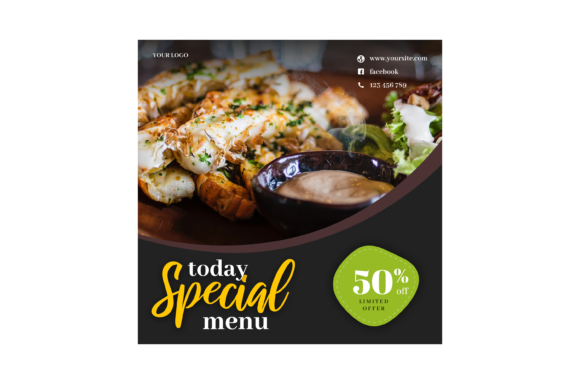
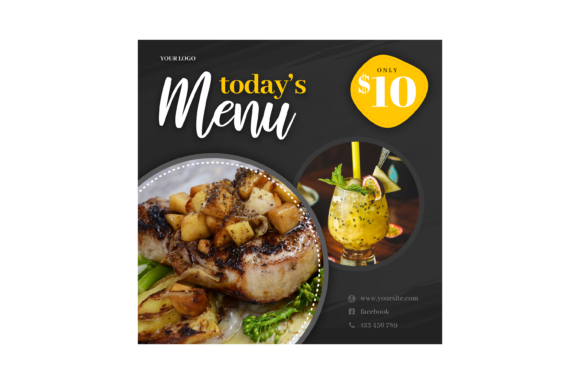
What you’re looking at isn't just a static image file. This specific Today's Menu Instagram Post template is built as a fully functional design asset in Photoshop. The key feature that sets it apart is the use of Smart Object Replacement. This might sound technical, but it’s incredibly practical. Imagine you have a fantastic photo of your new weekend special. Instead of resizing, cropping, and worrying about alignment every time, you simply open the designated smart layer in the PSD file, paste your photo, save, and close. The template automatically applies the perfect frame, effects, and positioning from the original design. It’s a game-changer for maintaining a consistent visual style across all your posts.
The dimensions are another crucial detail. At 3000×3000 pixels, this template is optimized for high-resolution displays. Whether it’s viewed on a smartphone, a tablet, or a desktop, the image will remain sharp and clear. This is vital for conveying quality. A blurry or pixelated post can subconsciously signal a lack of professionalism, while a crisp, high-res image builds trust and appetite. The fact that it’s editable and built with organised layers means you’re not locked into a single design. You have full control to change colors, move elements, and adjust text to match your specific brand identity.
Practical Applications for Your Brand
The real value of a tool like this lies in its versatility. Let’s break down how different professionals can leverage it.
For a small restaurant owner or food truck operator, this is your secret weapon for weekly promotions. Update your daily specials, highlight a happy hour, or announce a new dish in minutes, not hours. The easy-to-edit nature means your front-of-house manager could even handle the updates, freeing you up for other tasks. The consistent look you create across your social media graphics directly strengthens your brand recognition. Customers will start to recognize your “menu post” style in their feed before they even read the text.
Content creators and food bloggers can use this to present recipes, restaurant reviews, or meal prep guides with a unified aesthetic. Instead of designing a new graphic from scratch for every post, you have a reliable foundation that ensures visual consistency. This consistency is what helps build a professional portfolio and makes your content more shareable. Pair it with a complementary premium font from the included link to elevate your editorial design further.
Even marketing professionals managing accounts for food brands or culinary events can benefit. The template provides a clean framework for announcing pop-ups, food festivals, or cooking classes. Its professional presentation is perfect for marketing assets that need to look credible and engaging. The editable layers make it simple to adapt the design for different campaigns while keeping core branding elements intact.
Design Choices That Drive Engagement
Let’s talk about the typography, which is critical for readability. The template uses placeholder text that you’ll replace using the Text Tool. This is where your font choice comes into play. The included Read Me.txt file with a font link is a thoughtful touch, suggesting a typeface that complements the design’s style. Choosing the right typeface for your menu items isn’t just about aesthetics; it’s about clarity. A beautiful but overly ornate script font might be perfect for a headline but disastrous for a list of ingredients. You’ll want to consider font pairing—using a bold, clean sans serif font for dish names and a simpler style for descriptions to ensure everything is easily scannable.
The layout itself is designed for audience engagement. The clean lines and ample space around the text prevent visual clutter, allowing the food photography and key information to shine. This thoughtful composition guides the viewer’s eye naturally from the image to the details, increasing the likelihood they’ll read your entire post and take action—like saving the post, sending it to a friend, or clicking the link in your bio.
Getting Started and Making It Yours
The process is straightforward, designed for real-world use, not just for advanced designers. Once you open the PSD CS4 or higher file, locate the layers panel. You’ll see clearly labeled groups for the image, background, text, and decorative elements. To change the food photo, simply double-click the Smart Object layer thumbnail. This opens a new window where you paste your high-quality image. After saving (Ctrl/Cmd + S), the main template updates automatically. For text, use the Text Tool, click on the placeholder, and type your new menu items or specials. The organised layers make it simple to isolate and change colors of borders, backgrounds, or text to match your brand’s palette.
Before you post, always preview the final image. Check the readability of your text against the background. Is the contrast strong enough? If you’re using a handwritten font for a special offer, ensure it’s still legible at a glance on a small screen. This attention to detail separates good content from great content.
Ultimately, this Today's Menu Instagram Post template is more than a one-time download. It’s a reusable design asset that can become a cornerstone of your social media strategy. It empowers you to produce high-quality, consistent social media graphics efficiently, allowing you to focus more on creating amazing food and connecting with your community, and less on wrestling with design software. The result is a feed that looks intentionally crafted, builds stronger brand identity, and keeps your audience coming back for more.