Create a Stunning New Year Flyer That Captures the Celebration
As the calendar year winds down, the pressure to create visually arresting promotional material for New Year's Eve events becomes real. Whether you are a small business owner hosting a countdown party, a graphic designer working for a client, or a content creator looking to engage your audience with festive vibes, the challenge remains the same: how do you create something that looks professional, captures the spirit of celebration, and stops the scroll on social media? The answer often lies in high-quality, customizable design assets that allow for personalization without requiring you to start from a blank canvas.
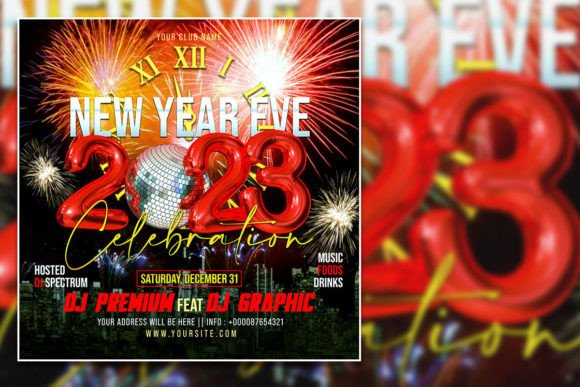
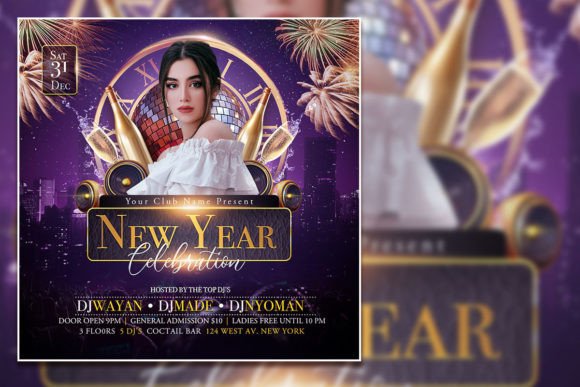
Imagine having a foundation for your Happy New Year Social Media Post or event invitation that already embodies the energy of a celebration. You're not just getting a static image; you're acquiring a versatile design tool. This particular New Year Celebration Flyer Template, sized perfectly at 2000x2000 pixels with a high 300 dpi resolution, is built in Adobe Photoshop (PSD format). This means every single element is at your fingertips to modify. The organized layers make it intuitive to navigate, allowing you to swap out text, change colors, and even replace the placeholder photo with your own custom image in minutes. It’s a practical solution for anyone who needs a polished result without the extensive time investment of building a design from the ground up.
Beyond the Flyer: Maximizing Your Design Assets
The true value of a well-structured template like this lies in its adaptability. Think of it as a cornerstone for your entire New Year's marketing campaign. The core design can be repurposed across multiple platforms to maintain visual consistency, which is crucial for brand recognition. For instance, the same visual theme used on a printed poster for a local bar can be seamlessly adapted into a series of social media graphics for Instagram Stories, a Facebook event cover, and even a graphic for your website's homepage banner.
This approach strengthens your brand identity. When your audience sees the same stylistic elements—from color palette to typography—across different touchpoints, it builds familiarity and trust. The template's design serves as a starting point for creating a suite of marketing assets. You could use it to generate:
- Digital invitations sent via email or direct message.
- Eye-catching graphics for your blog announcing special holiday hours or sales.
- Templates for packaging design if you're running a holiday product promotion.
- Visuals for merchandise like digital wallpapers or printable party decorations.
By editing the text with the text tool in Photoshop, you can tailor the message for any of these applications. Change the headline from "New Year's Eve Bash" to "Exclusive New Year Sale" and you have a completely different marketing tool derived from the same professional asset.
Typography and Tone: Setting the Right Mood
One of the most powerful aspects of this editable PSD template is the control it gives you over typography. The fonts chosen for a celebration design are not incidental; they contribute significantly to the overall mood. A bold, modern display font for the headline conveys energy and excitement, perfect for a nightclub event. A more elegant script font or handwritten font might be used for details to add a touch of sophistication, suitable for a formal dinner party.
When you open the file, you can select the text layers and experiment. Consider the font pairing already in place. Does a strong sans-serif headline paired with a clean serif body text create the right balance of impact and readability? If your event has a specific theme—like a retro disco or a sleek, modern gala—you can easily swap the fonts to match. This is where understanding basic modern typography principles pays off. The goal is to ensure your text is not only stylistically appropriate but also legible at both the small size of a social media thumbnail and the larger scale of a printed poster.
Remember, the template is your playground. If the original font doesn't feel right for your brand's voice, change it. The process is straightforward: use the text tool, highlight the existing text, and choose a new typeface from your library. This simple act can completely transform the feel of the design, aligning it perfectly with your editorial design or event's aesthetic.
Practical Steps for a Personalized New Year Creation
Getting started with your customized New Year Flyer Template is a straightforward process designed to save you time. First, ensure you have Adobe Photoshop installed. Open the provided PSD file, and you'll immediately see the well-organized layers panel. This structure is a huge time-saver; instead of digging through a messy file, you can quickly locate the "Text" group, the "Photo" layer, and the "Background" elements.
Here’s a simple workflow to follow:
- Replace the Photo: Locate the smart object or layer designated for the image. Double-click it, place your own high-resolution photo of your venue, your product, or a festive stock image, and save. The template will automatically update.
- Edit the Text: With the text tool (T), click on each text block. Delete the placeholder text and type your event details: date, time, venue, ticket information, or your custom message. Adjust the font, size, and color if needed.
- Tweak Colors and Elements: Feel free to adjust the color of decorative elements or the background to match your brand's color scheme. Use the Hue/Saturation adjustment or simply change the color of shape layers.
- Export for Use: Once satisfied, use "Save As" or "Export" to create a final JPEG or PNG for digital products and social media, or a high-quality PDF for print materials.
This hands-on customization ensures your final product is unique. You're not just using a generic template; you're leveraging a professional design framework to create a tailored piece of communication that feels authentically yours.
Ensuring Professional Polish and Commercial Clarity
Before you finalize your design, take a moment to review it with a critical eye. Zoom in to check for any typographical errors or alignment issues. View it at the size it will be displayed—is the text still easy to read? Does the overall composition guide the viewer's eye to the most important information first? This step separates an amateur effort from a professional presentation that boosts audience engagement.
Finally, a crucial consideration for any designer, entrepreneur, or business owner is licensing. When you download a premium font or a design template for commercial use, always verify the license. The template files themselves are typically licensed for both personal and commercial use, allowing you to create and sell physical or digital products, use them in marketing assets, and incorporate them into client work. However, if you choose to add new, third-party serif fonts, sans serif fonts, or script fonts to the design, you must ensure you have the proper commercial license for those as well. This due diligence protects your business and respects the work of other creators.
By starting with a robust, editable New Year Celebration Flyer Template, you equip yourself with a powerful tool to execute your creative vision efficiently. It’s about working smarter, not harder, to produce designs that resonate, celebrate, and effectively communicate your message as the new year begins.